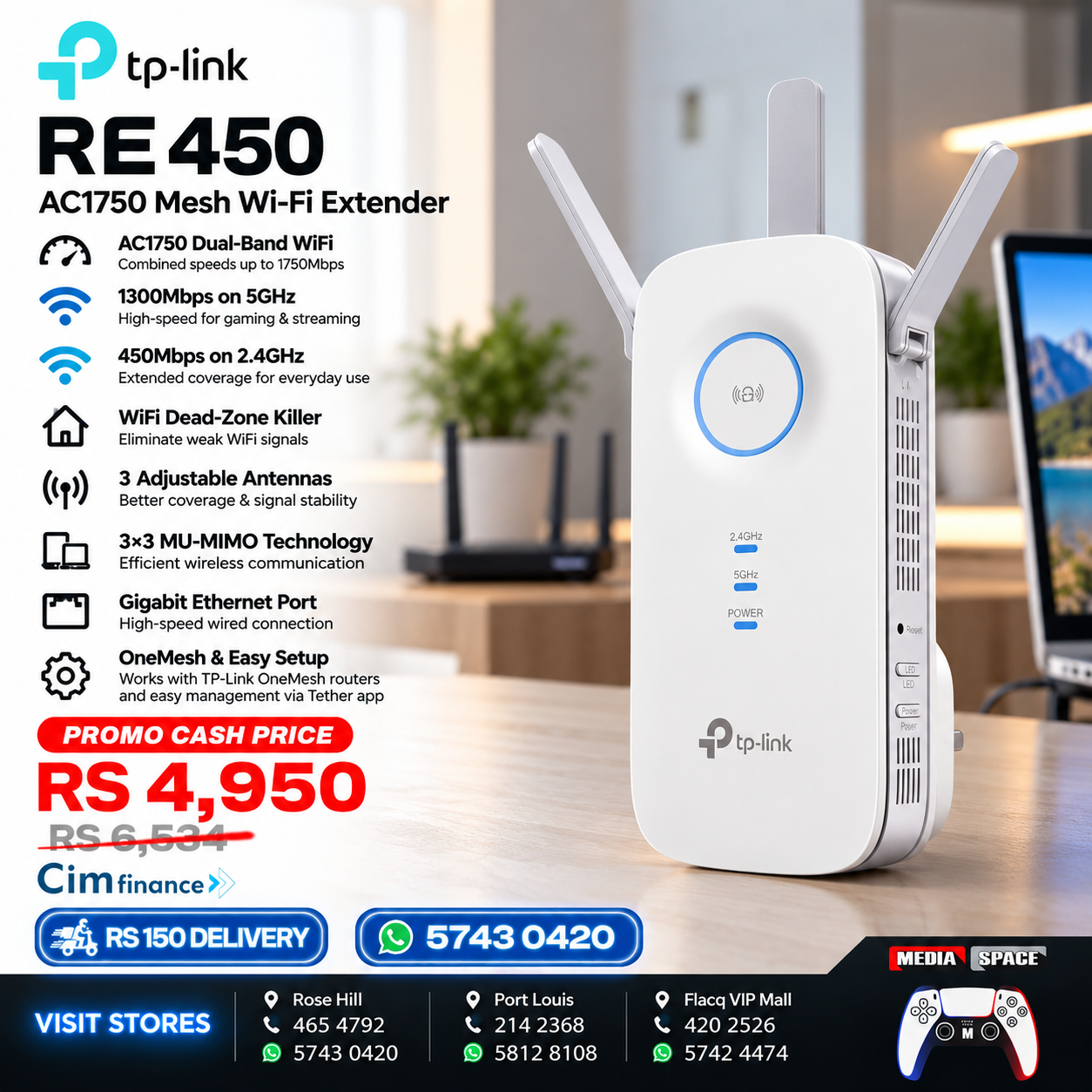


TP-Link AC1750 WiFi Extender RE450
📝 DESCRIPTION
Eliminate Wi-Fi dead zones and enjoy stronger wireless coverage throughout your home or office with the TP-Link RE450 AC1750 Wi-Fi Range Extender.
Designed to extend the coverage of an existing wireless network, the RE450 delivers dual-band Wi-Fi with combined theoretical wireless speeds of up to 1750Mbps, including 450Mbps on the 2.4GHz band and 1300Mbps on the 5GHz band.
Equipped with three adjustable external antennas, the TP-Link RE450 helps improve wireless coverage in areas where your main router’s signal is weak, such as bedrooms, upstairs rooms, home offices and other distant spaces.
The built-in Gigabit Ethernet port allows you to connect compatible wired devices, including desktop computers, smart TVs and gaming consoles. It also supports Access Point Mode, allowing you to create a wireless network from an existing wired Ethernet connection.
With its convenient RE button, intelligent signal indicator and compatibility with a wide range of Wi-Fi routers, the TP-Link RE450 offers a practical solution for improving everyday wireless connectivity.
Ideal for homes, apartments, offices and multi-room environments in Mauritius.
₨4,950.00 ₨6,534.00

|
|
|
|
|---|---|---|
|
Tired of Wi-Fi “dead zones”? The TP-LINK AC1750 Wi-Fi Range Extender connects to your router wirelessly, strengthening and expanding its signal into areas it can’t reach on its own. The device also reduces signal interference to ensure reliable Wi-Fi coverage throughout your home or office. |
TP-LINK’s RE450 comes with next generation 802.11AC Wi-Fi technology, it’s 3 times faster than the standard 802.11n speeds. The RE450 delivers fast speeds of dual band Wi-Fi up to 1750 Mbps, providing reliable connections for bandwidth-intensive tasks like HD/4K streaming, lag free gaming, large file downloads. |
A gigabit Ethernet port turns the extender into a wireless bridge, letting you connect a wired device like a Blu-ray player, gaming console, DVR, or smart TV to your Wi-Fi network. |


|
|
|
|
|---|---|---|
|
The extender RE450 works with any standard wireless router. Instantly connect the RE450 to a router by pressing the extender’s RE button followed by the router’s WPS button (if available). Once connected with an existing router, you can take RE450 to an ideal place, no more further configurations. |
The Intelligent signal light can help to find the best location to place the extender. |
Three external dual band antennas (3 x 2dBi for 2.4GHz and 3 x 3dBi for 5GHz) boost your wireless coverage and reliability, helping your devices stay connected anywhere your network reaches. |


📋 SPECIFICATION
| Specification | Details |
|---|---|
| Brand | TP-Link |
| Model | RE450 |
| Product Type | Wi-Fi Range Extender |
| Wi-Fi Class | AC1750 |
| Wireless Standard | IEEE 802.11a/b/g/n/ac |
| Frequency Bands | 2.4GHz & 5GHz |
| 2.4GHz Maximum Link Rate | 450Mbps |
| 5GHz Maximum Link Rate | 1300Mbps |
| Combined Advertised Speed | Up to 1750Mbps |
| Antennas | 3 External Adjustable Antennas |
| Ethernet Port | 1 × Gigabit RJ45 |
| Operating Modes | Range Extender / Access Point |
| Wireless Security | WEP, WPA/WPA2-PSK |
| Setup | RE Button / Web Interface / Tether App |
| Signal Indicator | Intelligent Signal LED |
| Power Supply | Direct Wall Plug |
| Dimensions | Approx. 163 × 76.4 × 66.5mm |
| Compatibility | Standard Compatible Wi-Fi Routers |
| Recommended Use | Home, Office & Multi-Room Coverage |
Wireless speeds are theoretical maximum link rates. Actual internet speeds and coverage depend on your router, broadband connection, connected devices, building layout and interference.
📶 AC1750 DUAL-BAND WI-FI
The TP-Link RE450 supports simultaneous 2.4GHz and 5GHz wireless bands.
450Mbps
2.4GHz Band
Longer-range connectivity for compatible devices
1300Mbps
5GHz Band
Higher wireless link rates for compatible devices
The combined AC1750 rating represents the theoretical maximum of both bands, not the speed of a single device.
🏠 EXTEND WI-FI COVERAGE
Improve connectivity in areas where your router’s wireless signal struggles to reach.
Ideal for:
-
🛏️ Bedrooms
-
🛋️ Living Rooms
-
💻 Home Offices
-
🏢 Workspaces
-
🏠 Upstairs Rooms
-
📺 Entertainment Areas
The extender should be positioned within reliable wireless range of your existing router.
📡 THREE EXTERNAL ANTENNAS
The RE450 features three adjustable external antennas designed to improve wireless signal distribution.
Their adjustable design allows you to optimise antenna positioning according to your installation environment.
🔌 GIGABIT ETHERNET PORT
The integrated Gigabit Ethernet port allows compatible wired devices to connect to your network through the extender.
Suitable for:
-
🖥️ Desktop Computers
-
📺 Smart TVs
-
🎮 Gaming Consoles
-
💻 Laptops
-
🌐 Compatible Network Devices
Actual wired internet performance remains dependent on the extender’s connection to the main network.
🌐 ACCESS POINT MODE
The TP-Link RE450 can also operate as a wireless access point.
Connect it to an existing wired network through Ethernet to create a Wi-Fi network for compatible wireless devices.
This is particularly useful in offices and homes with available Ethernet network connections.
💡 INTELLIGENT SIGNAL INDICATOR
The built-in signal indicator helps you identify a suitable installation location.
Position the extender where it receives a sufficiently strong signal from your main router to achieve more reliable extended coverage.
🔘 EASY WI-FI SETUP
The RE450 supports convenient setup using its RE button with compatible WPS-enabled routers.
You can also configure and manage supported functions through the TP-Link Tether app or web management interface.
🎬 STREAMING & ENTERTAINMENT
Extend your wireless network to compatible devices used for:
-
🎬 Video Streaming
-
🎮 Online Gaming
-
📺 Smart TV Applications
-
💻 Web Browsing
-
📱 Social Media
-
🎵 Music Streaming
-
📞 Video Calls
Performance depends on network conditions and signal quality.
🔐 WIRELESS NETWORK SECURITY
The RE450 supports common wireless security protocols, helping protect compatible wireless connections.
For best security, use supported WPA2 settings and keep your network equipment updated.
🔌 CONVENIENT WALL-PLUG DESIGN
The compact plug-in construction allows the extender to be installed directly into a compatible electrical outlet without requiring a separate desktop power adapter.
Place it in a suitable location between your router and the area requiring improved coverage.
🖥️ WIDE DEVICE COMPATIBILITY
Suitable for connecting compatible devices including:
-
📱 Smartphones
-
📲 Tablets
-
💻 Laptops
-
🖥️ Desktop Computers
-
📺 Smart TVs
-
🎮 Gaming Consoles
-
🖨️ Wireless Printers
-
📷 Wi-Fi Cameras
-
🏠 Smart Home Devices
📦 WHAT’S INCLUDED
-
📶 1 × TP-Link RE450 AC1750 Wi-Fi Range Extender
-
📖 Quick Installation Guide
🛡️ WARRANTY
Manufacturer / Supplier Warranty – Terms & Conditions Apply
CREDIT PAYMENT OPTION
Credit Payment Option
📦 Item Details
🔒 Sealed in box
✅ Opened & tested at purchase
💰 Price
🏷️ Normal Price: Rs.6,534
⚡ Promo Price: Rs.4,950
👉 Cash Only • Limited Time Offer
❌ No Cheque / No Juice / No Bank Transfers
💵 You may cash your cheque and pay in-store
🏦 Credit Facilities – C.I.M
📍 Quotation in-shop only (with ID Card)
📧 Email quotations not accepted
💡 Credit purchases charged at Regular Price
📑 Original quotation required (copies not accepted)
📝 Process:
- Apply in shop with required documents
- C.I.M approval & documents signed
- ✅ Collect your item / arrange delivery (ID copy + signature required)
💳 Payment Options (C.I.M)
1️⃣ Existing Clients (No Deposit)
- 12 Months: Rs.610/month
- 24 Months: Rs.338/month
- 36 Months: Rs.247/month
- 48 Months: Rs.202/month
- Must be a registered client ✔️
- No late payments ✔️
- No outstanding balance ✔️
2️⃣ New Clients (or requiring deposit)
💵 20% Deposit: Rs.1,307
- 12 Months: Rs.488/month
- 24 Months: Rs.271/month
- 36 Months: Rs.198/month
- 48 Months: Rs.162/month
📂 Required Documents:
- 🆔 ID Card
- 🏠 Proof of address (+ Birth Certificate if not in your name)
- 📑 Last 3 payslips
- 🏢 Confirmation letter from workplace
- 🏦 Last 3 months’ bank statement (optional but helps approval)
- 💰 20% deposit (if applicable)
🏛️ DBM Credit Finance
✔️ Cheque accepted (via DBM only)
💵 Price: Rs.5,693
🧾 Processing & accounting fees apply
⚠️ Shop conditions also apply
⚖️ Shop Terms & Conditions
📌 Promo Price = Cash Only • Limited Time Offer
📌 Credit purchases charged at Regular Price
📌 Quotation must be original & dated (no copies accepted)
📌 Credit approval subject to C.I.M/DBM policies
📌 Item delivery only after approval + signed documents + ID copy
📌 Mediaspace reserves the right to refuse service if requirements are not met
Related products
-
Accessories & Gadgets, Light Decorative item, NEW PRODUCTS
waterproof USB LED LIGHT 5m
USB RGB LED LIGHT 5Meter
Cash Price :Rs.400-Flexible RGB LED strip creates new and exciting, vibrant color lighting effects that were once impossible to achieve.
-Ideal for cove, pelmet, shelf or wardrobe lighting or in commercial applications, product displays, under counter lightings this LED strip comes by the meter in a number of different color, with indoor or outdoor rating.
-Environment friendly, no radiation, no flicker, no harm to human eyes.
-Power saving, no heat, low power consumption, stable performance.-This strip comes with a 5M self adhesive backing tape for easy application to almost any clean surface.
SKU: n/a -
NEW PRODUCTS, PlayStation 4 PS4 DISC GAMES
DEATH STRANDING
NEW SEALED IN BOX
WhatsApp 57430420 or call 4654792 or 4656278 or 2142368
You can also message us on Facebook or Instagram account name mediaspace.mu
Games can be bought via Cash/Juice/CIM/Rogers.
We also offer delivery services Rs.250 anywhere in Mauritius in less than 48Hoursor by Post office for Rs.90 within 5 working days
SKU: n/a